
Joomla වල Artilces edit කරන්න පහසුකම් මදි කියලා හිතුනාද? Joomla වල එන්නේ Tiny MCE කියන WYSIWYG (What You See Is What You Get) editor එක.
Article එකක් add කරන්න ගියාම පේන්නේ මේ විදියටනේ.
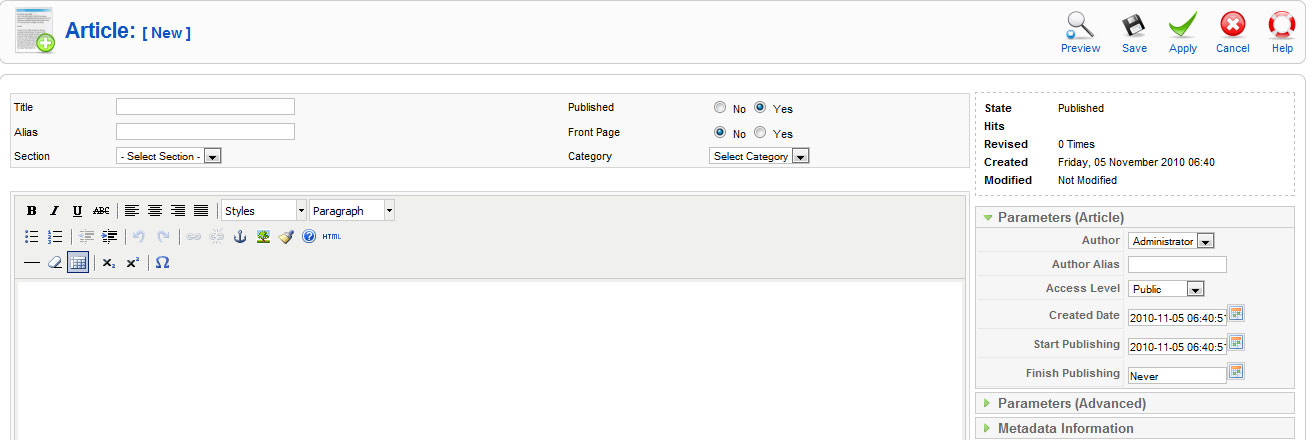
මේකෙ ඇත්තටම ටිකක් පහසුකම් මදි තමා.
අපි අලුත් Editor එකක් එකතු කරගම්මු.
JCE editor එක හොඳ විසඳුමක්. ඉස්සෙල්ලා http://www.joomlacontenteditor.net/downloads/editor මෙතනින් බාගන්කෝ Component එක. ඕකෙ තියෙන JCE Installation Package ගත්තම හරි. දැන් මේක Extensions>> Install/Uninstall හරහා ස්ථාපිත කරගන්න.
ඒත් ස්ථාපිත කරගත් පමණින් Editor එකේ වෙනසක් පේන්න ලැබෙන එකක් නැහැ. අපි Default Editor එක වෙනස් කරන්න ඕනි.
Site>> Global Configuration වල Site Settings යටතේ තියෙන එකෙන් Editor-JCE කියන එක තෝරලා save කරගන්න. දැන් Article එකක් add කරන්න ගිහින් බලන්න.

දැන් හරි නේද?
[...] Joomla: Want more facilities to edit articles? ජූම්ලා වෙබ් අඩවිය ත්රෛභාෂාවෙන්ම | How to localize a Joomla Web site AKPC_IDS += "301,";Popularity: 20% [?] [...]
Joomla walin wada karanna gaththa witharai..
thanx for info.. maka try karalaa balanna ona.
This blog is Very good and very useful. I wish you all the best and very good bright future.
Thanks a lot..
ela machan.thnx
Ela machan Nice